Java基础--Stream流
原文:CSDN(历史文章导入,当前状态为草稿)
Stream流是Java8及之后版本引入的新特性,主要用于简化集合和数组操作.
通过Stream流,可以将集合或数据中的数据按照特定方式进行转换,过滤,映射,排序等操作,从而实现复杂的数据处理逻辑.
它提供了一种新的数据处理方式,简化集合和数组的操作,提高代码的可读性和可维护性.
Stream概念
Section titled “Stream概念”Java8新增的接口,允许以声明性方式处理
数据集合
.
Stream可以看作遍历数据集合的高级迭代器(Iterator).
Stream操作可以像Builder一样逐步叠加,形成一条流水线.流水线由数据源+N个中间操作+一个终端操作构成.
补充:
什么是声明式编程
声明式的理解都是相对于命令式(imperativ)而言的,是对于命令式编程不同的编程泛型的一种合称.
声明式编程中我们描述的是目标状态,命令式编程中我们描述的是一系列动作.

Stream特点
Section titled “Stream特点”- 只能消费一次: Stream实例只能遍历一次,终端操作一次遍历后就结束,再次遍历需要重新生成实例,这一点类似于Iterator迭代器.
- 保护数据源: 对Stream中任何元素的修改都不会导致数据源被修改,比如过滤删除流中的一个元素,再次遍历该数据源依然可以获取该元素.
- 懒惰: 串联一系列的中间运算,如果没有一个终端操作,那么这些中间运算永远不会被执行.
Stream基本内容
Section titled “Stream基本内容”可以将Stream流操作分为3种类型:
- 创建Stream
- Stream中间处理
- 终止Stream
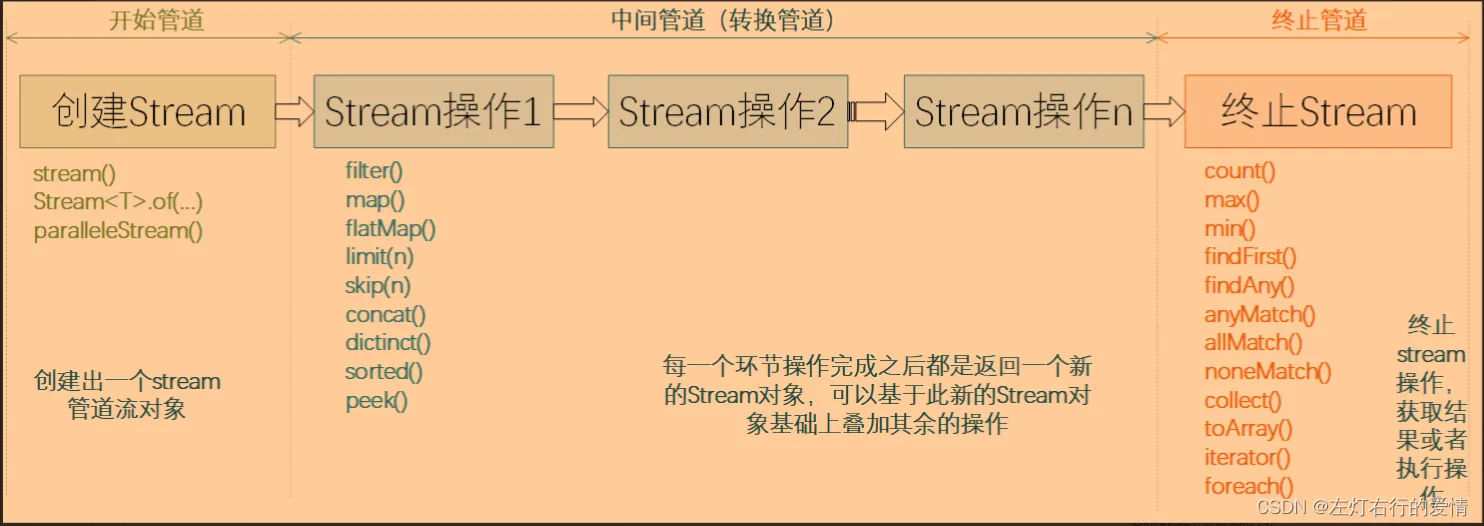
每个Stream管道操作类型都包含N个API方法,先列举下各API方法的功能介绍.
可以新建一个Stream流,或者基于现有的数组,List,Set,Map等集合类型对象创建出新的Stream流.
| API | 功能说明 |
|---|---|
| stream() | 创建出一个新的stream串行流对象 |
| parallelStream() | 创建出一个可并行执行的stream流对象 |
| Stream.of() | 通过给定的一系列元素创建一个新的Stream串行流对象 |
- 使用集合创建Stream实例(常用方式)
List<String> list = Arrays.asList("a", "b", "c");Stream<String> stream = list.stream();再来一个例子 List<String> list = new ArrayList<>();        list.add("武汉加油");        list.add("中国加油");        list.add("世界加油"); Stream<String> stream = list.stream();
集合还可以调用parallelStream()方法创建并发流,默认使用ForkJoinPool.commonPool()线程池List<Long> aList = new ArrayList<>();Stream<Long> parallelStream = aList.parallelStream();- 使用数组创建Stream实例
1. 使用Arrays.stream()int[] array={1,3,5,6,8};Stream<String> stream = Arrays.stream(array)2.使用Stream.of()stream = Stream.of("武汉加油", "中国加油", "世界加油");查看 Stream 源码的话,你会发现 of() 方法内部其实调用了 Arrays.stream() 方法。public static<T> Stream<T> of(T... values) { return Arrays.stream(values);}负责对Stream进行处理操作,并返回一个新的Stream对象,中间管道操作可以进行叠加.
| API | 功能说明 |
|---|---|
| filter() | 按照条件过滤符合要求的元素,返回新的stream流 |
| map() | 将已有元素转换为另一个对象类型,一对一逻辑,返回新的stream流 |
| flatMap() | 将已有元素转换为另一个对象类型,一对多逻辑,即原来一个元素对象可能会转换为1个或者多个新类型的元素,返回新的stream流 |
| limit() | 仅保留集合前面制定个数的元素,返回新的stream流 |
| skip() | 跳过集合前面制定个数的元素,返回新的stream流 |
| concat() | 将两个流的数据合并起来为1个新的流,返回新的stream流 |
| distinct() | 对stream中所有元素进行去重,返回新的stream流 |
| sorted() | 对stream中所有元素按照指定规则进行排序,返回新的stream流 |
| peek() | 对stream流中的每个元素进学逐个遍历处理,返回处理后的stream流 |
map与flatMap
Section titled “map与flatMap”map与flatMap都是用于已有的元素转换为其他元素.
区别点在于:
- map必须是一对一的,即每个元素都只能转换为一个新元素
- flatmapkey是一对多的,即每个元素都可以转换为一个或者多个新的元素.
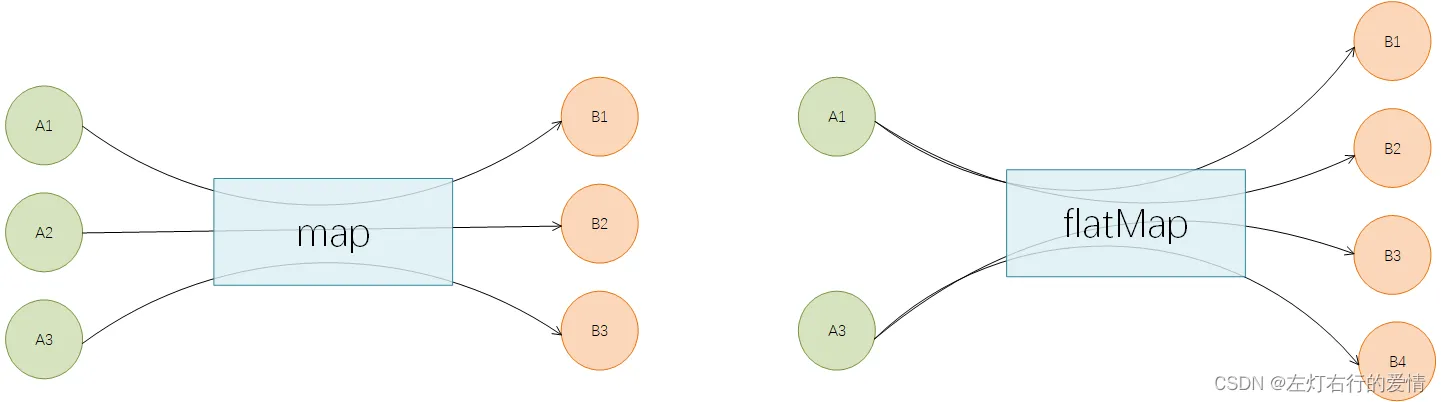
举个例子:有一个字符串ID列表,现在需要将其转为User对象列表。 - 用map来实现
/** * 演示map的用途:一对一转换 */public void stringToIntMap() { List<String> ids = Arrays.asList("205", "105", "308", "469", "627", "193", "111"); // 使用流操作 List<User> results = ids.stream() .map(id -> { User user = new User(); user.setId(id); return user; }) .collect(Collectors.toList()); System.out.println(results);}执行结果如下:[User{id='205'}, User{id='105'}, User{id='308'}, User{id='469'}, User{id='627'}, User{id='193'}, User{id='111'}]再举个例子:现有一个句子列表,需要将句子中每个单词都提取出来得到一个所有单词列表。这时map就不行了.
- 用flatMap来实现
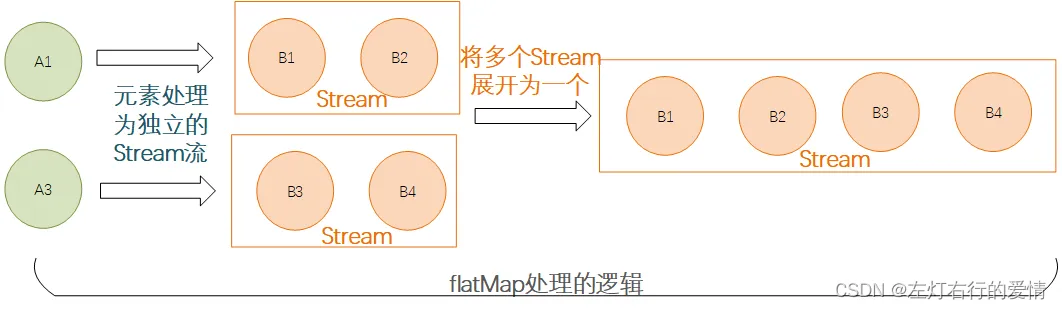
public void stringToIntFlatmap() { List<String> sentences = Arrays.asList("hello world","Jia Gou Wu Dao"); // 使用流操作 List<String> results = sentences.stream() .flatMap(sentence -> Arrays.stream(sentence.split(" "))) .collect(Collectors.toList()); System.out.println(results);}执行结果如下:[hello, world, Jia, Gou, Wu, Dao]补充一句: flatMap操作的时候其实是先对每个元素处理后返回一个stream,然后将多个stream展开
合并
为一个新的完整的stream,如下图所示:
peek和foreach方法
Section titled “peek和foreach方法”它们都可以对元素进行遍历然后逐个进行处理
但是注意,peek属于中间方法,而foreach属于终止方法,也就是说peek只能作为管道中途的一个处理步骤,而没办法直接执行得到结果,其后面必须还要有其他终止操作的时候才会被执行.
public void testPeekAndforeach() { List<String> sentences = Arrays.asList("hello world","Jia Gou Wu Dao"); // 演示点1: 仅peek操作,最终不会执行 System.out.println("----before peek----"); sentences.stream().peek(sentence -> System.out.println(sentence)); System.out.println("----after peek----"); // 演示点2: 仅foreach操作,最终会执行 System.out.println("----before foreach----"); sentences.stream().forEach(sentence -> System.out.println(sentence)); System.out.println("----after foreach----"); // 演示点3: peek操作后面增加终止操作,peek会执行 System.out.println("----before peek and count----"); sentences.stream().peek(sentence -> System.out.println(sentence)).count(); System.out.println("----after peek and count----");}执行结果:----before peek--------after peek--------before foreach----hello worldJia Gou Wu Dao----after foreach--------before peek and count----hello worldJia Gou Wu Dao----after peek and count----filter,sorted,distinct,limit
Section titled “filter,sorted,distinct,limit”这几个都是常用的stream的中间操作方法,具体的方法的含义在上面的表格里面有说明.
具体使用的时候,key根据需要选择一个或者多个进行组合使用,或者同时使用多个相同方法的组合:
public void testGetTargetUsers() {    List<String> ids = Arrays.asList("205","10","308","49","627","193","111", "193");    // 使用流操作    List<Dept> results = ids.stream()            .filter(s -> s.length() > 2)            .distinct()            .map(Integer::valueOf)            .sorted(Comparator.comparingInt(o -> o))            .limit(3)            .map(id -> new Dept(id))            .collect(Collectors.toList());    System.out.println(results);}
执行结果:[Dept{id=111}, Dept{id=193}, Dept{id=205}]- 使用filter过滤掉不符合条件的数据
- 通过distinct对存量元素进行去重操作
- 通过map操作将字符串转成整数类型
- 借助sorted制定按照数字大小正序排列
- 使用limit截取排在前3位的元素
- 又一次使用map将id转为Dept对象类型
- 使用collect终止操作将最终处理后的数据收集到list中
通过终止管道后,Stream流将会结束,最后可能会执行某些逻辑处理,或者是按照要求返回某些执行后的结果数据.
| API | 功能说明 |
|---|---|
| count() | 返回stream处理后最终的元素个数 |
| max() | 返回stream处理后的元素最大值 |
| min() | 返回stream处理后的元素最小值 |
| findFirst() | 找到第一个符合条件的元素时则终止流处理 |
| findAny() | 找到任何一个符合条件的元素时则退出流处理,这个对于串行流时与findFirst相同,对于并行流时比较高效,任何分片中找到都会终止后续计算逻辑. |
| anyMatch() | 返回一个boolean值,类似于isContains(),用于判断是否有符合条件的元素 |
| allMatch() | 返回一个boolean值,用于判断是否所有元素都符合条件 |
| noneMatch() | 返回一个boolean值,用于判断是否所有元素都不符合条件 |
| collect() | 将流转换为指定的类型,通过Collectors进行指定 |
| toArray() | 将流转换为数组 |
| iterator() | 将流转换为Iterator对象 |
| forEach() | 无返回值,对元素进行逐个遍历,然后执行给定的处理逻辑 |
简单结果终止方法
Section titled “简单结果终止方法”所谓的简单,指的是结果形式是数字,布尔值或者
Optional
对象值等.
我们可以使用count,max,min,findAny,findFirst,anyMatch,allMatch,noneMatch等方法来处理终止.
public void testSimpleStopOptions() {    List<String> ids = Arrays.asList("205", "10", "308", "49", "627", "193", "111", "193");    // 统计stream操作后剩余的元素个数    System.out.println(ids.stream().filter(s -> s.length() > 2).count());    // 判断是否有元素值等于205    System.out.println(ids.stream().filter(s -> s.length() > 2).anyMatch("205"::equals));    // findFirst操作    ids.stream().filter(s -> s.length() > 2)            .findFirst()            .ifPresent(s -> System.out.println("findFirst:" + s));}
执行结果为:6truefindFirst:205
注意: 一旦一个stream流被执行了终止操作之后,后续就不可以再读这个流执行其他的操作了.
结果收集终止方法
Section titled “结果收集终止方法”因为stream主要用于集合数据的处理场景,所以对于集合类的结果对象,就需要collect出场了,它支持生成下面类型的结果数据:
- 集合类,比如
List,Set,HashMap等 StringBuilder对象,支持将多个字符串进行拼接处理并输出拼接后的结果- 记录个数或者计算总和的对象(数据批量运算统计)
- 生成集合
public void testCollectStopOptions() {    List<Dept> ids = Arrays.asList(new Dept(17), new Dept(22), new Dept(23));    // collect成list    List<Dept> collectList = ids.stream().filter(dept -> dept.getId() > 20)            .collect(Collectors.toList());    System.out.println("collectList:" + collectList);    // collect成Set    Set<Dept> collectSet = ids.stream().filter(dept -> dept.getId() > 20)            .collect(Collectors.toSet());    System.out.println("collectSet:" + collectSet);    // collect成HashMap,key为id,value为Dept对象    Map<Integer, Dept> collectMap = ids.stream().filter(dept -> dept.getId() > 20)            .collect(Collectors.toMap(Dept::getId, dept -> dept));    System.out.println("collectMap:" + collectMap);}
执行结果如下:collectList:[Dept{id=22}, Dept{id=23}]collectSet:[Dept{id=23}, Dept{id=22}]collectMap:{22=Dept{id=22}, 23=Dept{id=23}}- 生成拼接字符串
原始做法:public void testForJoinStrings() {    List<String> ids = Arrays.asList("205", "10", "308", "49", "627", "193", "111", "193");    StringBuilder builder = new StringBuilder();    for (String id : ids) {        builder.append(id).append(',');    }    // 去掉末尾多拼接的逗号    builder.deleteCharAt(builder.length() - 1);    System.out.println("拼接后:" + builder.toString());}stream流做法:public void testCollectJoinStrings() {    List<String> ids = Arrays.asList("205", "10", "308", "49", "627", "193", "111", "193");    String joinResult = ids.stream().collect(Collectors.joining(","));    System.out.println("拼接后:" + joinResult);}
执行结果如下:拼接后:205,10,308,49,627,193,111,193- 批量数学运算
public void testNumberCalculate() {    List<Integer> ids = Arrays.asList(10, 20, 30, 40, 50);    // 计算平均值    Double average = ids.stream().collect(Collectors.averagingInt(value -> value));    System.out.println("平均值:" + average);    // 数据统计信息    IntSummaryStatistics summary = ids.stream().collect(Collectors.summarizingInt(value -> value));    System.out.println("数据统计信息: " + summary);}执行结果如下:
平均值:30.0总和: IntSummaryStatistics{count=5, sum=150, min=10, average=30.000000, max=50}
详解部分规约操作
Section titled “详解部分规约操作”规约操作(reduction operation)又被称为折叠操作(fold),通过某个连接动作将所有元素汇总成一个汇总结果的过程.
将所有元素转换成一个列表或集合,这些都属于规约操作.
stream类库有两个通用的规约操作:reduce和collect.
当然也有为简化书写而设计的专用规约操作:sum,max,count等
我们着重介绍reduce()和collect(),这是有些不太好理解.
reduce
Section titled “reduce”可以实现从一组元素中生成一个值,如sum(),max(),min(),count()等都是reduce操作,将他们单独设为函数只是因为常用.
reduce()的方法定义有三种重写形式:
- Optional reduce(BinaryOperator accumulator)
- T reduce(T identity, BinaryOperator accumulator)
- U reduce(U identity, BiFunction<U,? super T,U> accumulator, BinaryOperator combiner)
虽然函数定义越来越长,但是语义是不变的,多的参数只是为了指明初始值(参数identity),或者是制定并行执行时多个部分结果的合并方式(参数combiner).
reduce()最常用的场景就是从一堆值中生成一个值.
举例来说:
需求:从一组单词中找出最长的单词。
Stream<String> stream = Stream.of("I", "love", "you", "too");stream.reduce((s1,s2)->s1.length()>=s2.length() ? s1: s2);System.out.println(longest.get());执行结果:打印出love其中Optional是值的容器,使用它可以避免null值的麻烦.
当然你如果使用Stream.max(Comparator<? super T> comparator)方法来达到相同效果,但reduce有它存在的理由
需求:求出一组单词的长度之和。
// 求单词长度之和Stream<String> stream = Stream.of("I", "love", "you", "too");stream.reduce(0, //初始值(sum,str) -> sum+str.length(), //累加器(a,b) -> a+b); //部分和拼接器,并行执行时才会用到System.out.println(lengthSum);collect
Section titled “collect”如果你发现某个功能在stream接口中没找到,那么大概就在collect方法中可以找到其方法实现.
collect()是stream接口方法最灵活的一个,我们先看几个热身小例子:
// 将Stream转换成容器或MapStream<String> stream = Stream.of("I", "love", "you", "too");List<String> list = stream.collect(Collectors.toList()); // (1)// Set<String> set = stream.collect(Collectors.toSet()); // (2)// Map<String, Integer> map = stream.collect(Collectors.toMap(Function.identity(), String::length)); // (3)语义是很明确的,将stream流转换为List,Set和Map,但是可能会有几个疑问:
- Function.identity()是干什么的?
- String::length是什么意思?
- Collectors是个什么东西?
接口的静态方法和默认方法
Section titled “接口的静态方法和默认方法”Function是一个接口,那么Function.identiry是什么意思呢?可以从两方面解释:
- Java8允许在接口中加入具体方法.具体方法有两种,default方法和static方法,identiy就是Function接口的一个静态方法.
- Function.identity返回一个输出与输入一样的lambda表达式对象,等价于T-t形式的lambda表达式
在接口中default方法是一个无奈之举,在Java7及其之前要想在定义好的接口中加入新的抽象方法基本不可能,因为所有实现了该接口的类都要重新实现.
试想一下在Collection接口中加入一个stream抽象方法会怎么样?
default方法就是用来解决这个尴尬问题的,直接在接口中实现新加入的方法
例如String::length的语法形式叫做方法引用(method references),这种语法用来替代某些特定形式lambda表达式.
如果lambda表达式全部内容就是调用一个已有的方法,那么该方法引用可以用来替代lambda表达式.
| 方法引用类别 | 举例 |
|---|---|
| 引用静态方法 | Integer::sum |
| 引用某个对象的方法 | list::add |
| 引用某个类的方法 | String::length |
| 引用构造方法 | HashMap::new |
收集器(Collector)是为stream.collect()方法量身打造的工具接口(类).
考虑一下将一个stream转换成一个容器(或者Map)需要做哪些工作?我们至少需要两样东西:
- 目标容器是什么?是ArrayList还是HashSet,或者是TreeMap.
- 新元素如何添加到容器中? 是List.add()还是Map.put().
如果并行的还需要规约,需要告诉collect多个部分如何合并成一个.
综上分析,collect方法定义为<R> R collect(Supplier<R> supplier, BiConsumer<R,? super T> accumulator, BiConsumer<R,R> combiner),三个参数依次对应上述三条分析.
不过每次调用collect()都要传入这三个参数太麻烦,收集器Collector就是对三个参数简单封装,所以collect()另一个定义为<R,A> R collect(Collector<? super T,A,R> collector).
Collectors工具类可以通过静态方法生成各种常用的Collector.
举例如下:
// 将Stream规约成ListStream<String> stream = Stream.of("I", "love", "you", "too");List<String> list = stream.collect(ArrayList::new, ArrayList::add, ArrayList::addAll);// 方式1//List<String> list = stream.collect(Collectors.toList());// 方式2System.out.println(list);通常情况下我们不需要手动指定collect()的三个参数,而是调用collect(Collector<? super T,A,R> collector)方法,并且参数中的Collector对象大多数都是通过Collector工具类获得.
使用collect生成Collection
Section titled “使用collect生成Collection”前面提到通过collect方法将Stream转换为容器的方法,这里再汇总一下.
将Stream转换成List或Set是比较常见的操作,所以这里Collectors工具已经为我们提供了对应的收集器,通过如下代码即可完成:
// 将Stream转换成List或SetStream<String> stream = Stream.of("I", "love", "you", "too");List<String> list = stream.collect(Collectors.toList()); // (1)Set<String> set = stream.collect(Collectors.toSet()); // (2)上述代码可以满足大部分需求,但是返回结果是接口类型,我们并不知道类库实际选择的容器类型是什么,有时候我们想要认为指定容器的实际类型,这个需求可以通过Collecors.toCollection(Supplier<C> collectionFactory)方法完成
// 使用toCollection()指定规约容器的类型ArrayList<String> arrayList = stream.collect(Collectors.toCollection(ArrayList::new));// (3)HashSet<String> hashSet = stream.collect(Collectors.toCollection(HashSet::new));// (4)使用collect生成Map
Section titled “使用collect生成Map”stream背后依赖的数据库可以是数组,容器,但不能是Map.
反过来stream是可以生成Map 的,只是需要想清楚Map的key和value分别代表什么,要想清楚是要干什么,通常三种情况下collect的结果会是Map:
- 使用Collectors.toMap()生成的收集器,用户需要指定如何生成Map 的可以和value.
// 使用toMap()统计学生GPAMap<Student, Double> studentToGPA = students.stream().collect(Collectors.toMap(Function.identity(),// 如何生成key student -> computeGPA(student)));// 如何生成value- 使用Collectors.partitioningBy()生成的收集器,对元素进行二分区操作时可以用到.
这种情况适用将stream中的元素根据某个二值逻辑(满足条件,或不满足)分成互补相交的两部分,比如男女性别,成绩及格与否等.
// Partition students into passing and failingMap<Boolean, List<Student>> passingFailing = students.stream() .collect(Collectors.partitioningBy(s -> s.getGrade() >= PASS_THRESHOLD));- 使用Collectors.groupingBy()生成的收集器,对元素做group操作时可以用到.
跟sql中的groupby语句类似,这里的groupingBy也是按照某个属性对数据进行分组,属性相同的元素会被对应到Map的同一个key上.
下面代码展示员工按照部分进行分组:
// Group employees by departmentMap<Department, List<Employee>> byDept = employees.stream() .collect(Collectors.groupingBy(Employee::getDepartment));但有时候仅仅分组是不够的,在
sql
中使用groupby是为了协助其他查询,比如1.先将员工按照部门分组;2.然后统计每个部分员工的人数.
Java类库设计者也考虑到了这种情况,增强版的groupingBy()能够满足这种需求.
增强版的groupingBy()允许我们对元素分组之后再执行某种运算,比如求和,计数,平均值等.
这种将元素分组的收集器叫做上游收集器
之后执行其他运算的收集器叫做下游收集器
// 使用下游收集器统计每个部门的人数Map<Department, Integer> totalByDept = employees.stream() .collect(Collectors.groupingBy(Employee::getDepartment, Collectors.counting()));// 下游收集看起来代码逻辑像sql,高度非结构化.
但还有更复杂一些的,下游收集器还可以包含更下游的收集器,不是为了炫技而设计,确实是有实际场景需要.
考虑将员工按照部门分组的场景,如果我们想得到每个员工的名字(字符串),而不是一个个Employee对象,可通过如下方式做到:
// 按照部门对员工分布组,并只保留员工的名字Map<Department, List<String>> byDept = employees.stream() .collect(Collectors.groupingBy(Employee::getDepartment, Collectors.mapping(Employee::getName,// 下游收集器 Collectors.toList())));// 更下游的收集器本篇初稿描述了stream流最基础的用法,后续我也会不断的完善这篇文章,并且多多放入并发stream的内容,并且加业务场景进来,stream想要优雅的使用还是需要一些练习和更多的知识,我也会慢慢发掘和执行我的补全计划.